How to fill out the TDAC, field by field
Last updated:
The Thailand Digital Arrival Card takes about ten minutes if you have your passport and booking details ready. Use only the official site, tdac.immigration.go.th, and submit within 3 days of arrival, counting the arrival day. Check your exact opening time.
Before you start
- Your passport
- Flight or vehicle number for your arrival
- The address of where you will stay on your first night
- Your departure date, if you have booked one
- An email address that you can check on your phone
The form has three steps, then a preview. Fields marked with a red star are required.
1. Personal Information
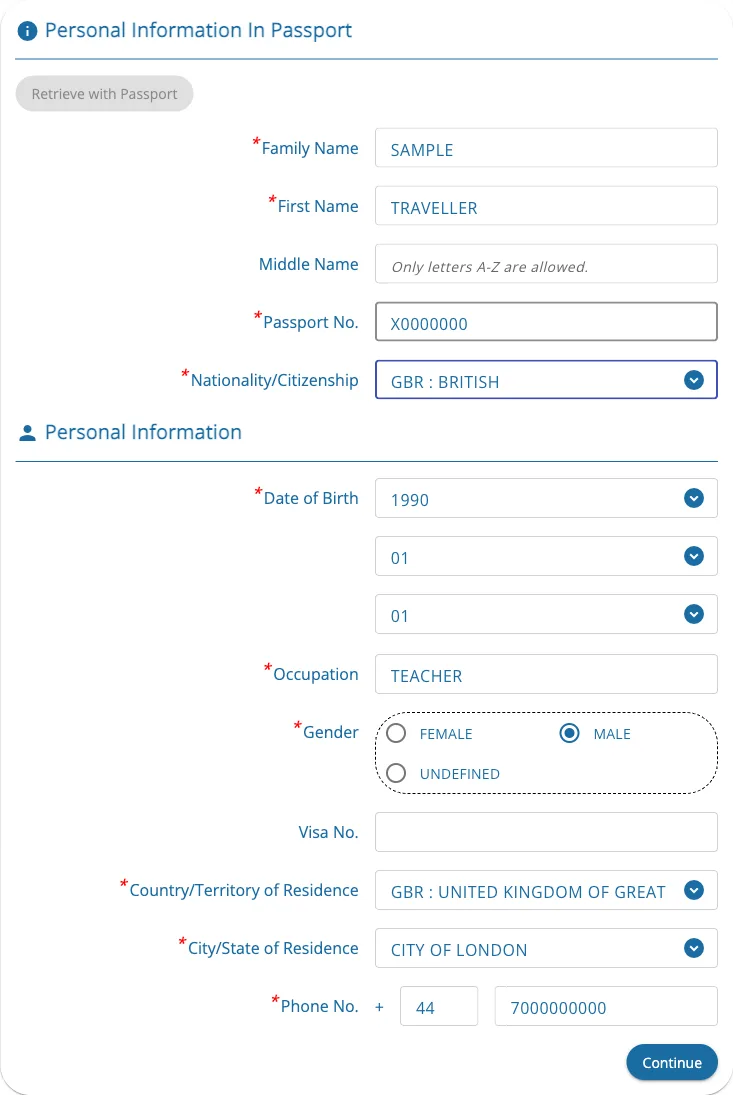
- Family Name, First Name and Middle Name: exactly as printed in your passport, in letters A–Z only. Middle Name is optional. Your name cannot be edited later.
- Passport No. and Nationality/Citizenship: these cannot be edited later either. Check them twice. The Retrieve with Passport button can fill in your details from an earlier card.
- Date of Birth (also cannot be edited later), Occupation and Gender.
- Visa No.: only if you have a visa. Leave it empty if you enter visa-free.
- Country/Territory of Residence, City/State of Residence and Phone No. with the country code.
2. Trip & Accommodation Information
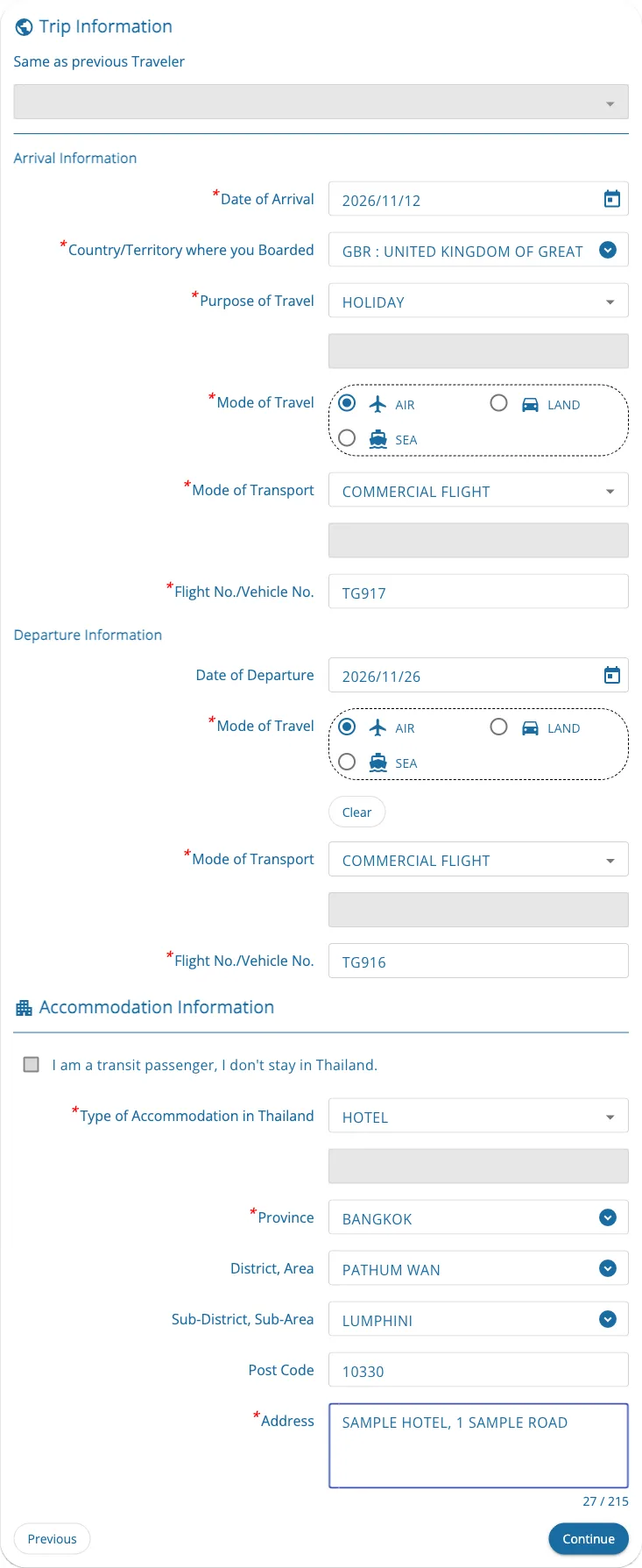
- Date of Arrival: the local date you land or cross the border. Only dates inside the submission window can be picked.
- Country/Territory where you Boarded: the last country before Thailand, not your home country if you connected elsewhere.
- Purpose of Travel, Mode of Travel (air, land or sea), Mode of Transport and Flight No./Vehicle No.
- Date of Departure: fill it in if you know it. If you do, the form also asks how you leave and your flight or vehicle number.
- Accommodation: Type of Accommodation, then Province, District/Area, Sub-District/Sub-Area, Post Code and Address (up to 215 characters) of your first night. Your hotel booking confirmation usually has all of it.
- Transit only? Tick I am a transit passenger, I don't stay in Thailand and the accommodation fields are skipped.
3. Health Declaration
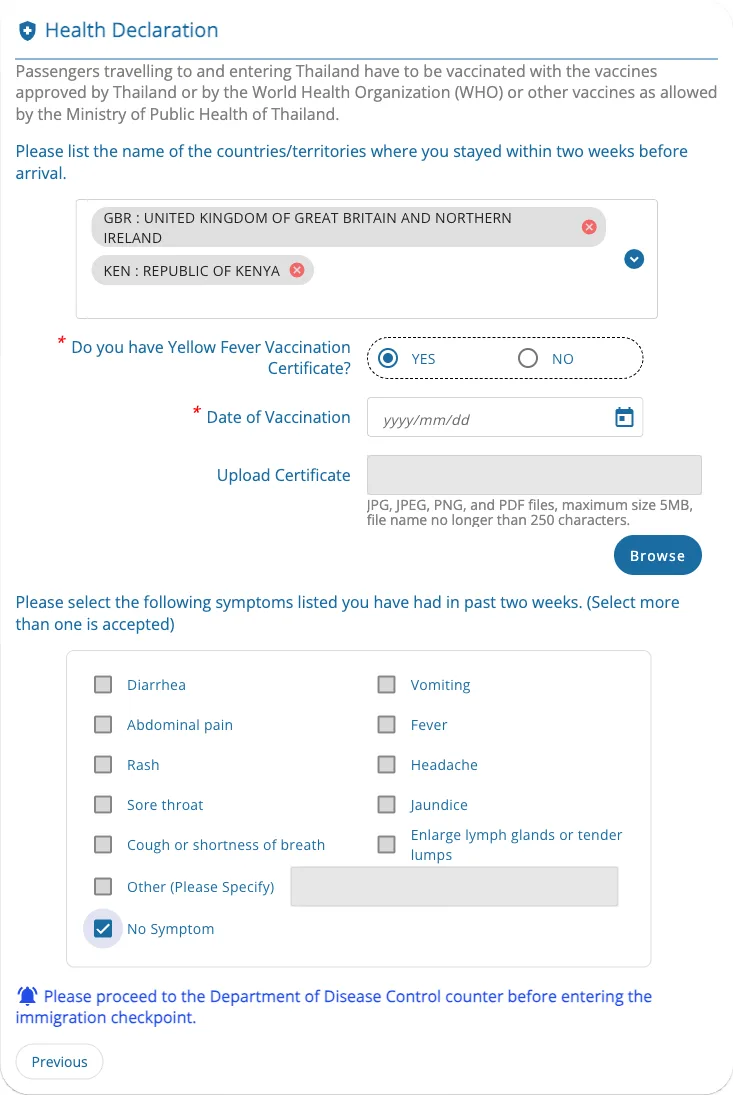
- Countries you stayed in during the two weeks before you arrive. For most travellers this is the only question on this step.
- If one of those countries is on Thailand's yellow fever list (for example Kenya), more questions appear: whether you have a Yellow Fever Vaccination Certificate, and if so its date and an upload (JPG, PNG or PDF, up to 5 MB), and a list of symptoms in the past two weeks, where you tick any that apply or No Symptom.
- In that case the form also tells you to go to the Department of Disease Control counter before immigration when you land.
4. Preview and submit
- Travelling together? Use Add Other Travelers before the preview; Same as previous Traveler copies the trip details.
- Check everything on the Preview page, then submit.
- Download the document with the QR code. A copy is also sent to your email. You do not need to print it.
Common mistakes
- Using a paid look-alike site. The official form is free. How to spot fake TDAC sites.
- A typo in your name, passport number, nationality or date of birth. These cannot be edited. Submit a new card; the latest one is used.
- Submitting too early. Arrival dates outside the window are greyed out and cannot be picked.
- Accents or other letters in your name. The name fields accept A–Z only; type the name as it appears in the machine-readable lines at the bottom of your passport photo page.
Sources
Last verified:
For information only, not legal advice. The immigration officer at your port of entry makes the final decision. ThaiSpend is an independent site and is not affiliated with Thai Immigration or any government agency. Spotted an error? Tell us.